 CommentScreen
What is CommentScreen?
CommentScreen helps make in-person events, online events, and classes more fun and engaging

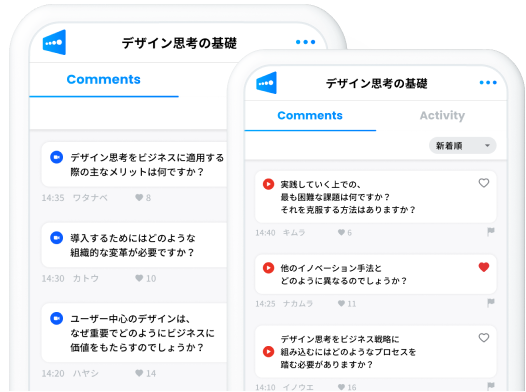
Show comments and reactions!
You can show on your screen the comments and reactions sent by listeners.
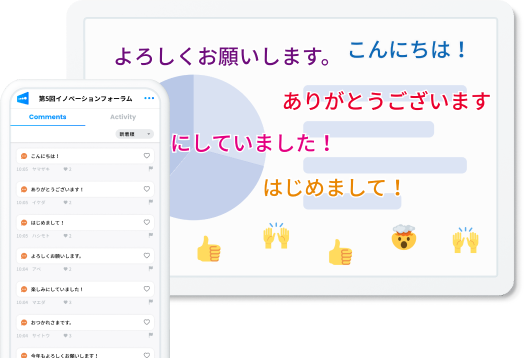

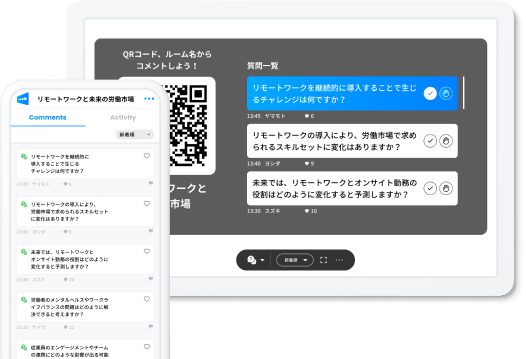
Don't miss a question
You can choose the questions or comments that were most commonly asked or received a lot of agreement from the audience, and start a Q&A session right away. You can also go back and review comments that were previously shown. Address the interests and questions of your viewers directly, creating a more interactive session.

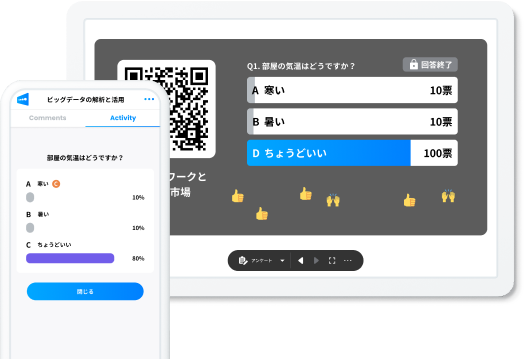
Make Live Polls!
By using live polls, you can gauge your audience's understanding and opinions during your presentation, enabling more effective communication. Additionally, analyzing the data from the poll results, we offer valuable insights to enhance your future presentations.

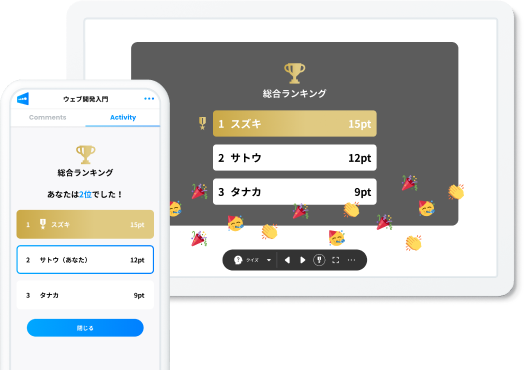
Have fun with quizzes
By taking quizzes during your presentation, you can increase engagement with the audience and deepen their understanding of the content. You can also announce the correct answers right away, which will increase the audience's excitement and enthusiasm to participate. Additionally, by providing further explanation when revealing answers, you can provide a more effective learning experience.

Connect to Zoom or YouTube Live for comments
Through integration with video conferencing tools or live streaming services such as Zoom or YouTube Live, you can collect comments and questions from your audience in real-time. The audience can post on CommentScreen without leaving the platform they are watching your presentation.


Video description
With video chat tools
CommentScreen works not only for in-person events, but also with video chat apps such as Zoom, Google Meet, and Microsoft Teams. You can also link to Zoom to receive Zoom comments.



Voices of our customers
See why customers love CommentScreen

This is it!!
While broadcasting on Zoom on event days, I can move this to the screen behind me and deliver everyone's love from all over the world at awards and new graduate entrance ceremonies! I can also use it for presentations where I'm sharing the Zoom screen, so it's really powerful. Thank you so much!

euglena
We used it for an online company-wide general meeting for 150 people.
We were able to visualize what the participants were thinking during our event and create a sense of realism. In the post-meeting questionnaire, one participant said, "Thanks to the CommentScreen, there was a sense of unity and excitement."

Goodpatch
A solution for sharing information and creating empathy with participants
Online event demands are ever increasing: sharing information, emotions, and participants' feedback has become very important in the online era. I believe that CommentScreen is the best fit for this era. CommentScreen is a solution that is very suitable for sharing information and creating empathy with participants during online events, and we are very excited about it.

Microsoft
Smooth communication between the presenter and their audience
We use CommentScreen in various situations such as study sessions, screen sharing presentations, and our monthly internal tech meetups. It has made it much easier to get people excited and to communicate with each other, and the presenter does not have to worry about whether the audience understands what he or she is saying. I feel that the quality of events has improved as a whole because the presenters can proceed at a faster pace without worrying about whether they are getting the message across. However, there are times when I get so engaged in the comments that I forget to talk. (Laughter)

CyberAgent
This is it!!
While broadcasting on Zoom on event days, I can move this to the screen behind me and deliver everyone's love from all over the world at awards and new graduate entrance ceremonies! I can also use it for presentations where I'm sharing the Zoom screen, so it's really powerful. Thank you so much!
euglena
We used it for an online company-wide general meeting for 150 people.
We were able to visualize what the participants were thinking during our event and create a sense of realism. In the post-meeting questionnaire, one participant said, "Thanks to the CommentScreen, there was a sense of unity and excitement."
Goodpatch
A solution for sharing information and creating empathy with participants
Online event demands are ever increasing: sharing information, emotions, and participants' feedback has become very important in the online era. I believe that CommentScreen is the best fit for this era. CommentScreen is a solution that is very suitable for sharing information and creating empathy with participants during online events, and we are very excited about it.
Microsoft
Smooth communication between the presenter and their audience
We use CommentScreen in various situations such as study sessions, screen sharing presentations, and our monthly internal tech meetups. It has made it much easier to get people excited and to communicate with each other, and the presenter does not have to worry about whether the audience understands what he or she is saying. I feel that the quality of events has improved as a whole because the presenters can proceed at a faster pace without worrying about whether they are getting the message across. However, there are times when I get so engaged in the comments that I forget to talk. (Laughter)
CyberAgent
This is it!!
While broadcasting on Zoom on event days, I can move this to the screen behind me and deliver everyone's love from all over the world at awards and new graduate entrance ceremonies! I can also use it for presentations where I'm sharing the Zoom screen, so it's really powerful. Thank you so much!
euglena
We used it for an online company-wide general meeting for 150 people.
We were able to visualize what the participants were thinking during our event and create a sense of realism. In the post-meeting questionnaire, one participant said, "Thanks to the CommentScreen, there was a sense of unity and excitement."
Goodpatch
A solution for sharing information and creating empathy with participants
Online event demands are ever increasing: sharing information, emotions, and participants' feedback has become very important in the online era. I believe that CommentScreen is the best fit for this era. CommentScreen is a solution that is very suitable for sharing information and creating empathy with participants during online events, and we are very excited about it.
Microsoft
Smooth communication between the presenter and their audience
We use CommentScreen in various situations such as study sessions, screen sharing presentations, and our monthly internal tech meetups. It has made it much easier to get people excited and to communicate with each other, and the presenter does not have to worry about whether the audience understands what he or she is saying. I feel that the quality of events has improved as a whole because the presenters can proceed at a faster pace without worrying about whether they are getting the message across. However, there are times when I get so engaged in the comments that I forget to talk. (Laughter)
CyberAgent
Download App
Whether you use PowerPoint, Keynote, or another application, comments and reactions are displayed on your screen. It also supports video chat tools such as Zoom, Google Meet, and Microsoft Teams.
Download for
Mac / macOS
Built-in Zoom integration is available only in the Windows Store version and the Mac download version (v2). For all other versions, please start Zoom integration from the web.
Contact Us
Please contact us if you have any questions about CommentScreen.